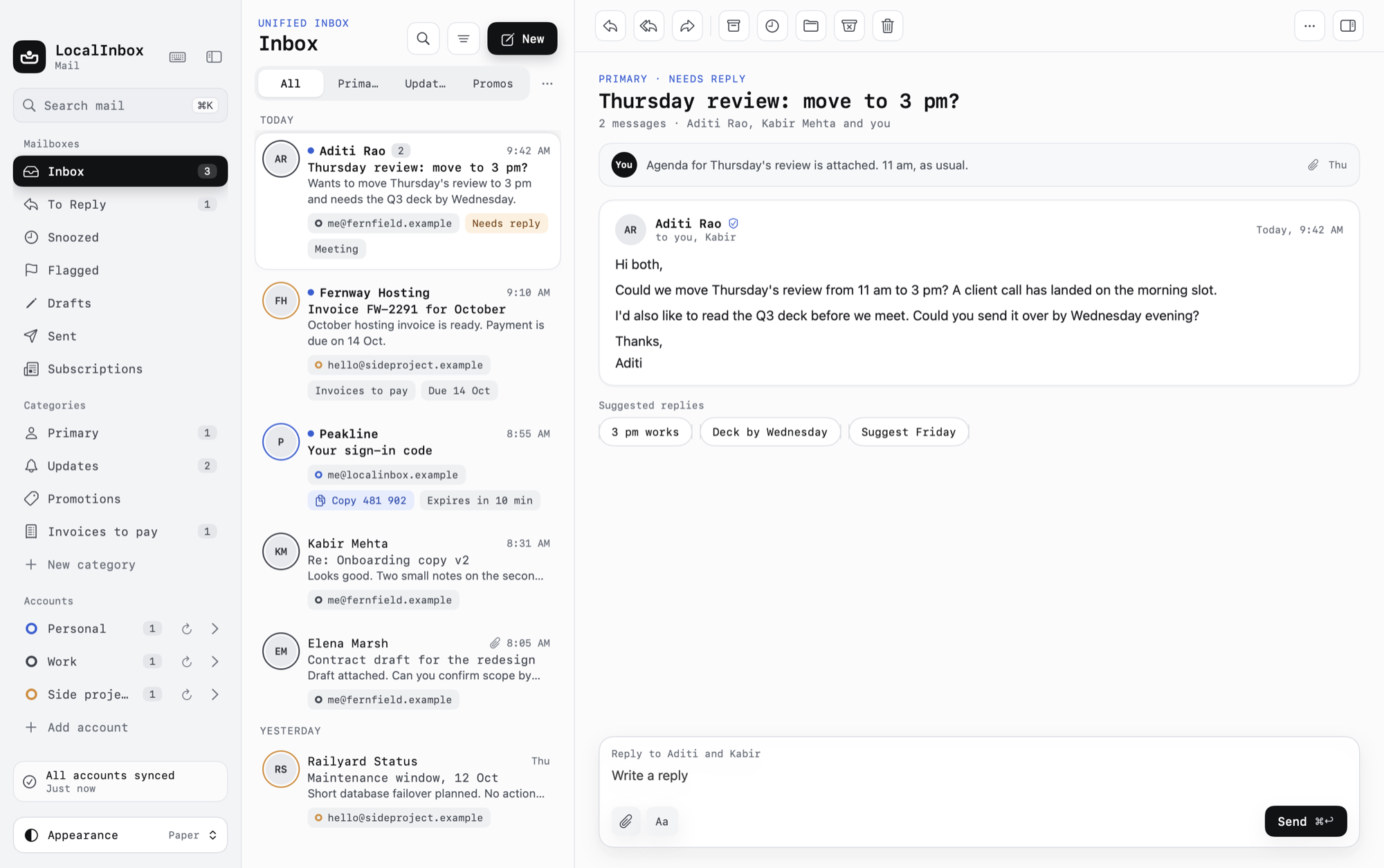
Smart mail,sorted on your Mac.
One inbox for Gmail, iCloud, Yahoo, Fastmail and any IMAP account. LocalInbox sorts, summarises and answers your mail with Apple's on-device model. No AI cloud reads it, and no server of ours sits in between.
- Native macOS
- No cloud AI
- Passwords in Keychain
macOS 15 or later. On-device AI features need macOS 26 with Apple Intelligence.
Works with the accounts you already have
- Gmail
- iCloud Mail
- Yahoo Mail
- Fastmail
- Outlooksoon
- Microsoft 365soon
- Any IMAP server
What happens when mail arrives
Every message takes the same path, on your Mac. Fast rules decide almost everything. Apple's model is asked only where it adds something, and your corrections always win.
- ArrivesIMAP IDLE push
- Rules0.3 ms on average
- Your correctionsOne move teaches it
- Apple IntelligenceNot needed for this one
- To ReplyA person asks you something, by a date. Rules alone.
The mail app that reads ahead for you
The things that eat your morning, handled on your Mac: questions answered from your own mail, codes ready to copy, and an inbox that already knows what needs you.
Ask your mailbox
Ask in plain words. The answer comes from your own mail, with every claim linked to the email it came from.
Search inside attachments
Text in scanned PDFs and photos is read on your Mac, so a receipt or a boarding pass turns up in search.
Every account, one inbox
Gmail, iCloud, Fastmail and any IMAP, side by side, each with its own colour. Filter to one in a click.
Sign-in codes, gone in a click
Codes show up in the notification. Copy it and the message files itself away, because codes are single-use.
Take it back
Undo Send gives you up to 30 seconds. Send Later, snooze and “remind me if no reply” work even with the app closed.
Your mail talks to one place: your mail server
Many “smart” mail apps send your messages to someone's AI to be read. LocalInbox does the reading on your Mac, so there is nothing to send.
- AI on your MacSorting, summaries, replies and Ask run on Apple's on-device model. No AI cloud is ever contacted.
- Passwords in the KeychainAccount passwords and sign-in tokens live in the macOS Keychain, never in a file or on a server.
- Trackers strippedRemote images wait until you allow them, tracking pixels are removed, and tracking parameters are cut from links.
- No LocalInbox server in the middleMail goes straight between your Mac and your provider. We never receive, store or read it.
Less time in your inbox, more of your day back
Everything a heavy email user reaches for, built the way a Mac app should be.
Native, and fast with a lot of mail
Built in Swift for macOS. With 100,000 messages cached, the unified inbox opens in 34 ms and search answers in 3 to 10 ms.
Keyboard first
⌘K finds any message or action. Single keys archive, snooze, flag and reply. Archive, move, snooze and send can be undone with ⌘Z.
Notifications that know what matters
Mail from people alerts you; newsletters wait. VIPs, quiet hours, per-account settings, and codes you can copy right from the banner.
Part of your Mac
Unread mail in the menu bar, quick compose from anywhere, Spotlight search, Shortcuts actions, Focus filters and the Share menu.
A tidy inbox without effort
Rules file mail as it arrives, one-click unsubscribe clears the newsletters, and a Subscriptions view shows every list you're on.
Yours to look at
Paper, Graphite, Native, Sand and Contrast themes, accent colours, and your choice of interface and reading fonts.
Measured on Apple silicon with a release build. Sources: the project's published performance and eval reports.
Try it free for 7 days
Every feature, on every account. No sign-up and no card: enter a licence key when you're ready.
- 1Unzip the download and drag LocalInbox to your Applications folder.
- 2Open LocalInbox. macOS says it can't verify the app: click Done.
- 3Open System Settings › Privacy & Security, click Open Anyway next to “LocalInbox was blocked”, and confirm.
LocalInbox isn't notarized by Apple yet, so macOS asks you to approve it the first time. You do this once: updates install from inside the app, signed with LocalInbox's release key and checked before they're installed.
Pay once. Keep it.
One lifetime licence, no subscription. Early buyers get it for less while we're new. Try it free for 7 days first.
- Pay once. No subscription
- Up to 3 Macs per licence
- Unlimited accounts
- Every on-device AI feature
- All 1.x updates
- 7-day money-back guarantee
Secure checkout by Dodo Payments or Gumroad. Your licence key arrives by email.
The same licence and everything in it, at the regular price once the early-access licences are gone.
Buy for $49or buy on GumroadSmart mail, without the trade-offs
| Feature | LocalInbox | Cloud-AI mail apps | Subscription mail apps |
|---|---|---|---|
| AI runs on your Mac | varies | ||
| Answers cite the emails they come from | varies | varies | |
| Text in images and PDFs is searchable | varies | varies | |
| Menu bar, Shortcuts, Focus filters, Spotlight | varies | varies | |
| No company server reads your mail | varies | ||
| Pay once | varies |
Before you buy
Short answers about the licence, the AI and your accounts.
Yes. You pay once and the licence is yours, with every 1.x update included. There is no monthly or yearly plan.