By Manish, who makes LocalInbox · Facts checked November 2026
AOL Mail works in mail apps that connect over IMAP, with an app password you generate in your AOL account's Account Security. LocalInbox is a native Mac app that does this for you: choose AOL Mail, paste the app password, and AOL sits in one inbox beside Gmail, iCloud and Yahoo, with summaries and replies written on your Mac.
AOL Mail on a Mac today
AOL Mail works in a browser at mail.aol.com, and AOL's help explains how to sync AOL Mail in a third-party app over POP or IMAP.
A mail app on your Mac connects to imap.aol.com and smtp.aol.com, and signs in with an app password you generate in AOL's Account Security rather than your AOL password.
How LocalInbox works with AOL Mail
- It fills in AOL's servers itself: choose AOL Mail, enter your address and paste the app password.
- A button opens AOL's Account Security page, where Generate app password is. Name the password LocalInbox.
- aol.com, aim.com, aol.co.uk, aol.de and aol.fr addresses all use the same steps.
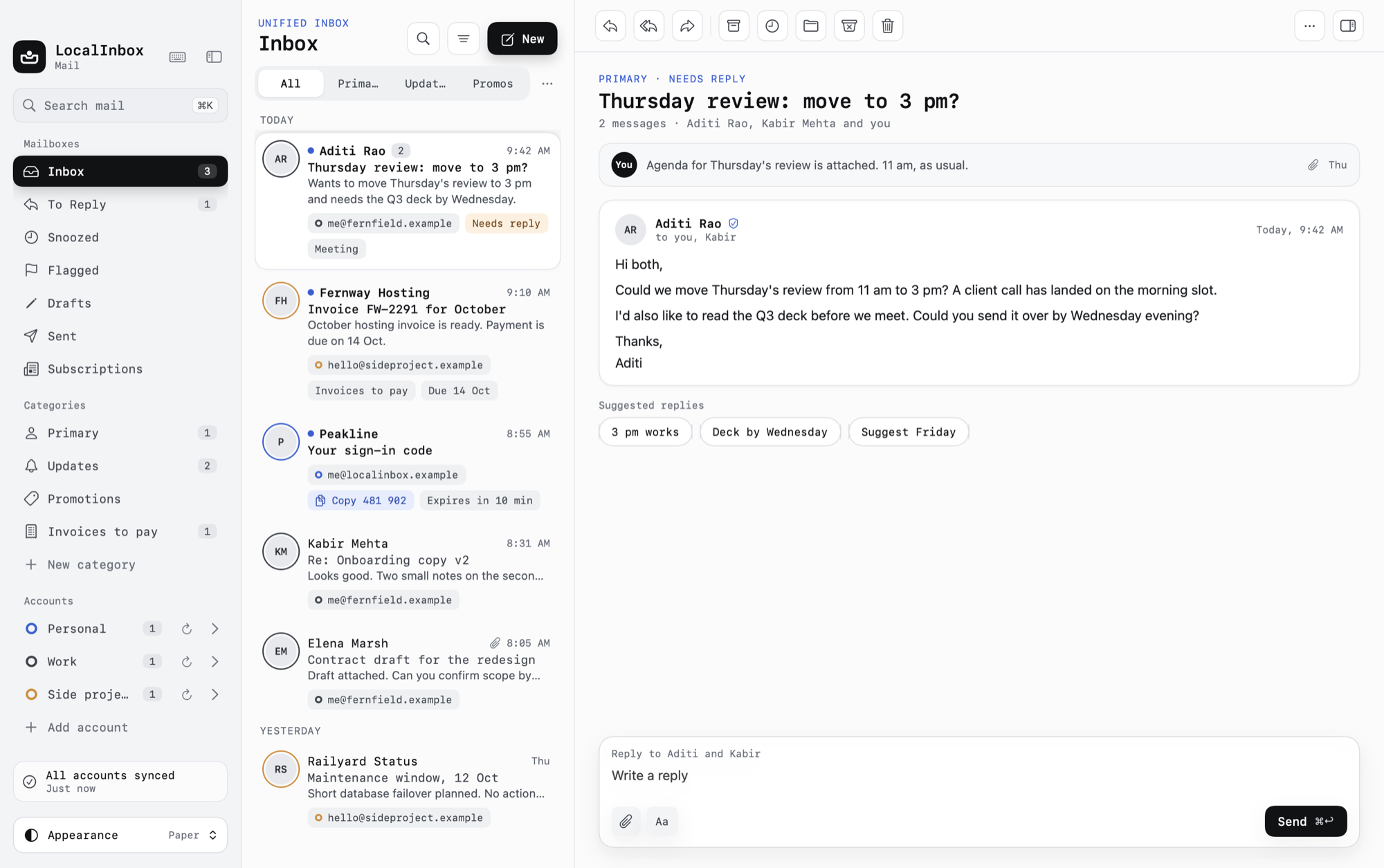
- AOL sits beside Gmail, iCloud and Yahoo in one inbox, with one search across all of them.
- The password is kept in the macOS Keychain and sent only to the mail server.
What LocalInbox adds
What every account gets in LocalInbox, AOL Mail included:
- Unified inbox: One inbox for Gmail, iCloud, Yahoo, Fastmail, Zoho, GMX, AOL, Proton Mail Bridge and any IMAP account, each with its own colour. Native and fast.
- On-device AI: LocalInbox summarises, sorts and drafts your email with Apple's on-device model. No AI cloud unless you add your own key, and no LocalInbox server.
- Ask your mailbox: Ask a question in plain words and LocalInbox answers from your own mail, with numbered sources you can open. It runs on your Mac by default.
- To Reply and smart sorting: LocalInbox sorts mail into Primary, Updates, Promotions and your own categories, and keeps a To Reply mailbox of mail waiting on you.
- Today and the Morning brief: Today lists what needs a reply, what you're waiting on, meetings, deadlines, parcels and trips. The Morning brief sums up important mail, on your Mac.
- Waiting On and Nudge: Waiting On lists mail you sent that hasn't had an answer after three days. Nudge writes a polite follow-up for you to edit and send.
- Phishing warnings: LocalInbox flags suspected phishing and says why: a look-alike address, failed SPF, DKIM or DMARC, a misleading link, or pressure to sign in or pay.
- Search inside attachments: LocalInbox reads the text in scanned PDFs and photos on your Mac, so a receipt or a boarding pass turns up in search.
- Undo Send, Send Later and snooze: Undo Send for up to 30 seconds, Send Later, snooze, and remind me if no reply, for every account. They work even when LocalInbox is closed.
Set up AOL Mail in LocalInbox
- In LocalInbox, open Settings › Accounts and click Add Account (or use the welcome screen the first time).
- Choose AOL Mail and enter your AOL address.
- Click Open AOL Account Security, then Generate app password, and name it LocalInbox.
- Paste it into LocalInbox and click Add.
Server settings and what to do if it doesn't connect: AOL Mail IMAP and SMTP settings, with an app password.
Sources
Facts about AOL Mail's own apps were checked in November 2026 and can change. Facts about LocalInbox come from its own documentation.
Questions
Can I have AOL and Yahoo Mail in the same app?
Yes. Both connect with an app password, and they show together in All Inboxes, beside any other account you add.
Do aim.com addresses work?
Yes. Choose AOL Mail: aim.com uses AOL's servers, and LocalInbox fills them in.
Can I keep using AOL Mail on the web too?
Yes. LocalInbox works over IMAP, so folders, read state and sent mail stay in step between the app and AOL Mail on the web, and you can use both.
What does LocalInbox cost?
It's free for 7 days with every feature, with no sign-up or card. Then it's $29.99 once, for up to three devices (Mac, iPhone or iPad), with every 1.x update. There's no subscription.
Is there a LocalInbox app for AOL Mail on iPhone?
Yes: LocalInbox for iPhone and iPad, with the same licence as the Mac. AOL Mail works there the same way, with Apple Intelligence on the device. Once it's in LocalInbox on your Mac, Set Up iPhone… copies it over with a QR code, password included: https://localinbox.app/iphone