By Manish, who makes LocalInbox · Facts checked October 2026
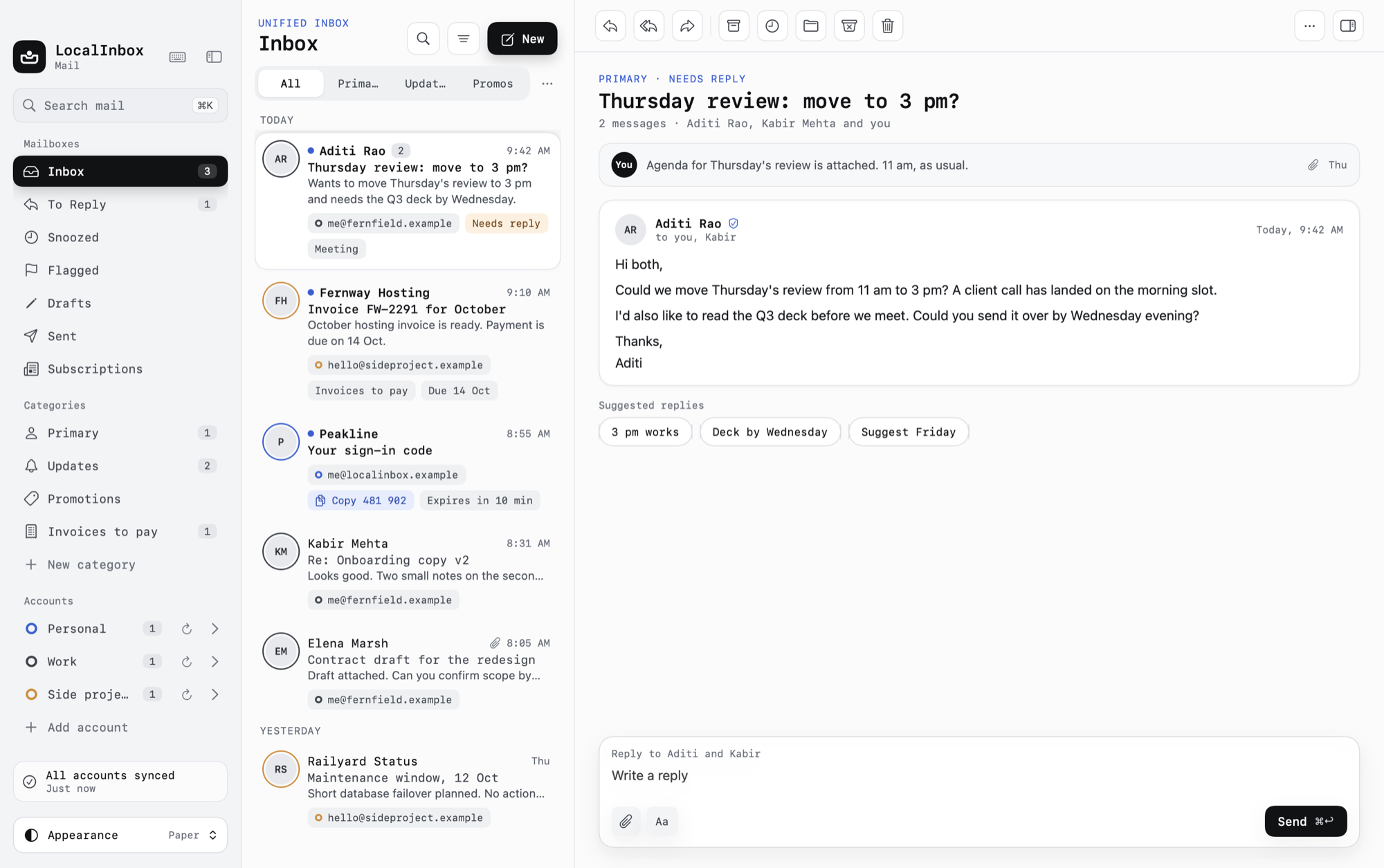
Apple Mail is free and built into macOS, and on Macs with Apple Intelligence it summarises mail on-device. LocalInbox uses the same on-device model and adds a To Reply mailbox, Ask your mailbox with cited sources, phishing warnings that explain why, text search inside image and PDF attachments, categories you describe in your own words, and Send Later and snooze that work while the app is closed. It costs a one-time $29.99.
At a glance
| Feature | LocalInbox | Apple Mail |
|---|---|---|
| Price | One-time licence: $29.99 | Free with macOS |
| Where AI runs | On your Mac by default: Apple's on-device model, or a model you run in Ollama or LM Studio. Claude or OpenAI only with your own key | Apple Intelligence, on-device on supported Macs |
| Surfacing what matters | To Reply mailbox of mail waiting on you | Priority messages at the top of the inbox |
| Categories | Primary, Updates, Promotions and your own, described in words | Apple's fixed categories |
| Accounts | Gmail, iCloud, Yahoo, AOL, Fastmail, Zoho, GMX, Proton Bridge, any IMAP | iCloud, Gmail, Yahoo, Outlook, Exchange, any IMAP |
| Platforms | Mac (iPhone and iPad in beta) | Mac, iPhone, iPad |
What it costs over three years
Apple Mail comes with macOS, so it costs nothing, this year or any other.
LocalInbox is $29.99 once, for up to three devices (Mac, iPhone or iPad) and every 1.x update. There's no subscription and no AI quota. At the full price that's about $16 a year over three years: the question is whether To Reply, Ask your mailbox and the rest save you more time than that.
Where your mail and the AI go
Both apps connect your Mac straight to your mail provider, with no mail-app company in between. Apple Mail's Mail Privacy Protection hides your IP address from senders and loads remote content in the background, so senders can't tell when you open a message.
LocalInbox has no server. Your Mac talks straight to your mail provider, passwords stay in the macOS Keychain, remote images load only from trusted senders unless you allow them, and tracking pixels and link-tracking parameters are removed. Every connection the app can make is listed on its privacy page (https://localinbox.app/security).
For AI, both use Apple Intelligence. LocalInbox uses Apple's on-device model or a model server you run on the same Mac, and a cloud model only if you add your own key.
The AI features side by side
Apple Intelligence in Mail summarises unread mail in the message list and any message or thread when you ask, puts urgent mail at the top as Priority Messages, and drafts Smart Replies you can refine with Writing Tools.
LocalInbox uses the same on-device model and builds more on it:
- A To Reply mailbox that collects mail from people who asked you something you haven't answered.
- Categories you describe in your own words, such as “Invoices to pay”, next to Primary, Updates and Promotions.
- Ask your mailbox: a question in plain words, answered from your mail with a numbered source after each claim. When your mail doesn't say, it tells you instead of guessing.
- A second opinion on suspected phishing, on top of the checks for look-alike addresses, failed SPF, DKIM or DMARC, and misleading links.
- The same features on Macs without Apple Intelligence, including Intel Macs, with a model you run in Ollama or LM Studio.
Day to day
Apple Mail can remind you about a message and suggest following up on sent mail that got no reply. It's also on your iPhone and iPad, where LocalInbox is still in beta.
What LocalInbox adds on the Mac:
- Undo Send from 5 to 30 seconds, Send Later, snooze and “remind me if no reply” on every account. A small helper sends scheduled mail and brings snoozed mail back while the app is closed.
- Search inside attachments: the text in scanned PDFs and photos is read on your Mac and added to search.
- Attachments that are programs, installers or scripts are blocked, even renamed or inside a ZIP.
- Rules, one-click unsubscribe and a Subscriptions view of every list you're on.
- ⌘K for any message or action, single-key triage, and ⌘Z to undo archive, move, delete, flag and snooze.
Switching from Apple Mail to LocalInbox
- You don't have to choose: run LocalInbox next to Apple Mail on the same accounts while you try it.
- Download LocalInbox and start the 7-day trial: every feature, no sign-up and no card.
- Add your accounts. Gmail, iCloud and Yahoo use an app password, and the setup guides have each provider's steps and server settings (https://localinbox.app/guides).
- There's nothing to export. Your mail stays on your provider, and LocalInbox downloads it over IMAP, so folders, read state and sent mail stay in step with the app you're leaving.
- Recreate your signatures in Settings › Composing, and the rules you rely on. Signatures, templates, rules and categories then follow you to your other Macs through iCloud.
- When you're ready, make LocalInbox your default mail app.
When LocalInbox is the better choice
- You want mail that needs you collected in one place, and newsletters out of the way.
- You want to ask your mailbox a question and see where the answer came from.
- You want phishing explained, and text in attachments searchable.
- You want Undo Send, Send Later, snooze and reminders that work while the app is closed.
When Apple Mail is the better choice
- You need Exchange or Outlook today: LocalInbox's Microsoft sign-in isn't available yet.
- You want the same app on iPhone and iPad.
- You get little mail and don't want to pay for a mail app.
Sources
Facts about Apple Mail were checked in October 2026 and can change; check its website for current prices and features. Facts about LocalInbox come from its own documentation.
Questions
Is LocalInbox more private than Apple Mail?
Both keep your mail between your Mac and your mail provider and run AI on-device, unless you add your own AI key to LocalInbox. LocalInbox also blocks remote images from senders it can't trust until you allow them, and strips tracking pixels and link tracking parameters.
Can I use LocalInbox and Apple Mail together?
Yes. Both connect to your mail server over IMAP, so read state, folders and sent mail stay in step. You can make either one your default mail app.
Does LocalInbox need Apple Intelligence?
No. Sorting, the To Reply mailbox, phishing warnings, search and everything else work on any Mac with macOS 15 or later. Summaries, suggested replies and Ask your mailbox need Apple Intelligence (macOS 26 on Apple silicon), a model server on your Mac such as Ollama or LM Studio, or your own Claude or OpenAI key. The last two work on Intel Macs too.
Is LocalInbox on iPhone, Windows or Android?
LocalInbox runs on the Mac, with iPhone and iPad in beta, with the same licence (https://localinbox.app/iphone ). Windows and Android: not yet. The waitlist (https://localinbox.app/waitlist) asks which platform you'd use, and it gets built if enough people ask.