The Mac email app with on-device AI
Every inbox in one Mac app. The AI stays on your Mac.
Gmail, iCloud, Yahoo, Fastmail and any IMAP account in one native app. It sorts each message as it arrives, summarises long threads and answers questions about your mail. No AI cloud reads any of it, unless you connect one with your own key.
- Free for 7 days
- No sign-up or card
- Pay once
- 7-day money-back guarantee
LocalInbox is on iPhone and iPad too. Get it on the App Store
LocalInbox is for the Mac, iPhone and iPad today. Want it on Windows? Leave your email: if enough people ask, I'll build it, and you'll hear first.
No confirmation email, nothing else in your inbox. On a Mac too? Send to my Mac


Works with the accounts you already have
- Gmail
- iCloud Mail
- Yahoo Mail
- Outlooksoon
- Microsoft 365soon
- Fastmail
- Proton Mail
- Zoho Mail
- AOL Mail
- GMX
- Any IMAP server
What LocalInbox is, in under a minute
All of it on demo mail, with Apple's on-device model answering for real.

Read what it says
LocalInbox puts every inbox in one Mac app, and the AI stays on your Mac. Gmail, iCloud, Fastmail or any IMAP account, all in one inbox. It sorts your mail, and To Reply keeps what's waiting on you. Summaries and suggested replies are written on your Mac by default. Ask your mailbox a question, and get the answer with the email it came from. Today shows what needs you: replies, deadlines, parcels and trips. Three looks and twenty themes, light or dark. Phishing warnings say why, and trackers come out of your mail. There's no LocalInbox server. Your mail goes between your Mac and your provider, and nowhere else, unless you choose. It's on iPhone and iPad too, and one scan brings your accounts across. Free for seven days, then pay once. One licence, for your Mac, iPhone and iPad.
01See it work
Ask your mail anything. Make it look like yours.
Ask a question in plain words and LocalInbox answers from your own mail, with numbered sources you can open. It runs on your Mac by default.
Money and bills
Amounts, due dates and payments, from the emails that sent them.
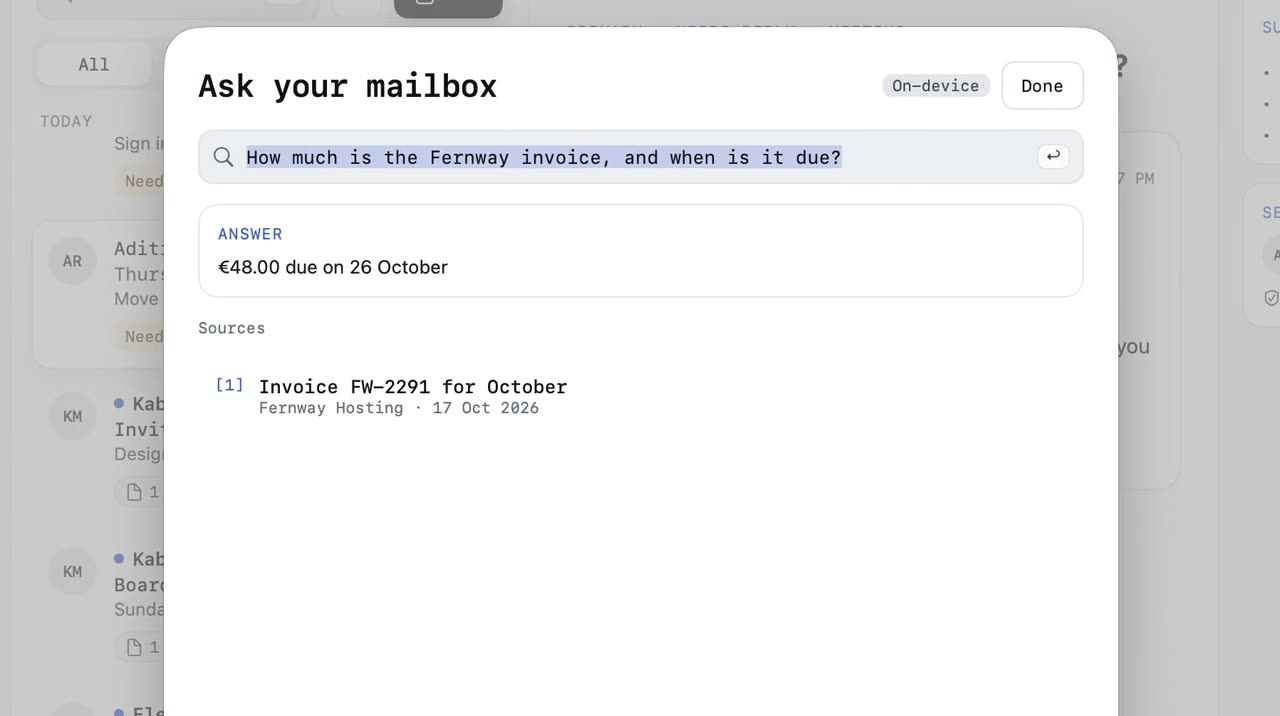
⌘K opens the palette, the question is typed, and the Ask your mailbox sheet, marked On-device, answers “€48.00 due on 26 October”, citing the invoice email, which then opens.
Recorded in LocalInbox on a demo mailbox, so the people and companies are made up. The answers are the on-device model’s, live; only the zoom was added. More about Ask
02How it works
What happens when mail arrives
By default, every message takes the same path, on your Mac. Fast rules decide almost everything. Apple's model is asked only where it adds something, and your corrections always win.
- ArrivesIMAP IDLE push
- RulesCategory, reply, phishing
- Your correctionsOne move teaches it
- Apple IntelligenceNot needed for this one
- To ReplyA person asks you something, by a date. Rules alone.
More about To Reply and sorting More about phishing warnings More about Waiting On and Nudge
03Features
The mail app that reads ahead for you
The things that eat your morning, handled on your Mac: attachments you can search, every account in one list, codes ready to copy, and sends you can take back.
Search inside attachments
Text in scanned PDFs and photos is read on your Mac, so a receipt or a boarding pass turns up in search.
More about attachment searchEvery account, one inbox
Gmail, iCloud, Fastmail and any IMAP in one list. Filter to one account in a click.
More about the unified inboxSign-in codes, gone in a click
Codes show up in the notification. Copy it and the message files itself away, because codes are single-use.
More about notificationsTake it back
Undo Send gives you up to 30 seconds. Send Later, snooze and “remind me if no reply” work even with the app closed.
More about Undo Send and Send LaterToday and the Morning brief Waiting On and Nudge Checks before Send
04Built for the Mac
A real Mac app. Fast with years of mail.
Everything a heavy email user reaches for, built the way a Mac app should be.
Native, and fast with a lot of mail
Built in Swift for macOS, not a web page in a window, so it opens, scrolls and searches without waiting, even with years of mail.
Keyboard first
⌘K finds any message or action. Single keys archive, snooze, flag and reply, and every shortcut can be changed. Archive, move, snooze and send undo with ⌘Z.
Notifications that know what matters
Mail from people alerts you; newsletters wait. VIPs, quiet hours, per-account settings, and codes you can copy right from the banner.
Part of your Mac
Unread mail in the menu bar, quick compose from anywhere, Spotlight search, Shortcuts actions, Focus filters and the Share menu.
A tidy inbox without effort
Rules file mail as it arrives, one-click unsubscribe clears the newsletters, and a Subscriptions view shows every list you're on.
Signatures and templates that travel
Signatures with your logo, five starter templates, and both follow you to your other Macs through iCloud.
05Private by design
Your mail goes to your Mac. Nowhere else, unless you choose.
Many “smart” mail apps send your messages to someone's AI to be read. LocalInbox does the reading on your Mac, so there is nothing to send. If you'd rather use Claude or OpenAI, add your own key and choose what they may read. It goes straight from your Mac to them, never through us.
- Passwords in the KeychainAccount passwords and sign-in tokens live in the macOS Keychain, never in a file or on a server.
- Trackers strippedRemote images wait until you allow them, tracking pixels are removed, and tracking parameters are cut from links.
- Dangerous attachments blockedPrograms, installers and scripts sent by email are blocked, even renamed or inside a ZIP. Risky files warn before they open.
Connections from this Mac
- Your mail serversIMAP and SMTP, straight to your provider
- Summaries, replies, Ask and sortingOn this Mac by default, with no connections of their own0 out
- localinbox.app update feedOnce a day, no cookies or identifiersno mail
- Licence checkEvery 14 days, with Dodo Payments. Nothing about your mail.no mail
- LocalInbox serverThere isn't onenone
- AI cloudNothing is sent to one, unless you add your own keynone
A summary of the app's published network list, on the security page in full. Anything not on that list would be a bug.
On-device AI
Less to read, quicker to answer. All of it on your Mac by default.
Apple's on-device model files mail into the categories you describe. Summaries and replies come from it, or from a model you run in Ollama or LM Studio. With your own key, Claude or OpenAI can write them instead.
- Fernway HostingInvoice FW-2291 for October, due 15 NovBills
- Aditi RaoThursday review: move to 3 pm?
- Riverside WaterYour bill is ready: £48.20Bills
- The Weekly LoopFive tools we tried this week
- Clearline MobilePayment reminder for account 4471Bills
Filed by Apple Intelligence on this Mac
Summary · 14 messages
- The launch moves to 18 November, now that legal has signed off.
- The store page must be ready by 12 November; Priya sends screenshots on Friday.
- Nobody has asked you for anything yet.
Summarised on this Mac
Written on this Mac
New in 1.6
Two new looks, Harbor and Contour. And Classic, just as you left it.
Already have LocalInbox? It updates itself, or choose Check for Updates in the LocalInbox menu.
Version 1.6.0 · out 10 Nov 2026
Harbor
The sidebar, the list and the message sit apart as panels, with a colour for each of Today, Inbox, To Reply, Waiting On and Snoozed, and conversations read as a chat. New installs start here.
Contour
One sidebar, with search and New Message at its top, and a wide reading column with the summary above the message.
Classic stays as it is
Nothing changes until you pick another look at the top of Settings › Appearance, and picking Classic again brings back your own settings.
Harbor and Contour are themes too
Use either with any look. Aurora and Frost are gone: if you used them, you're now on Moss or Glass, with your fonts as they were.
Claude or OpenAI, with your own key
Off until you add a key in Settings › Intelligence. Summarize, Draft with AI, Rewrite, Ask your mailbox and Write Rule can use it when you press the button, on Intel Macs too, and requests go straight from your Mac to the provider.
Outside assistants
Turn them on in Settings › Intelligence, and an assistant such as Claude Desktop can search and read mail in the accounts you allow, and save drafts for you to check. It can never send, archive, move or delete.
iPhone and iPad
Your inbox in your pocket. The AI still stays on the device.
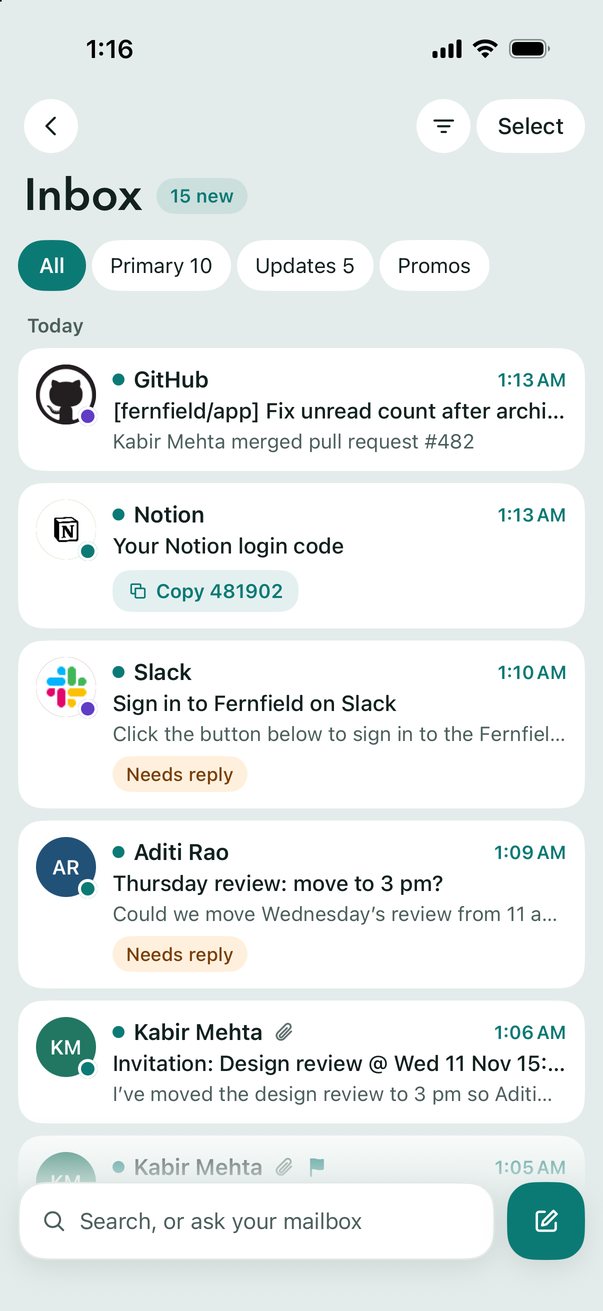
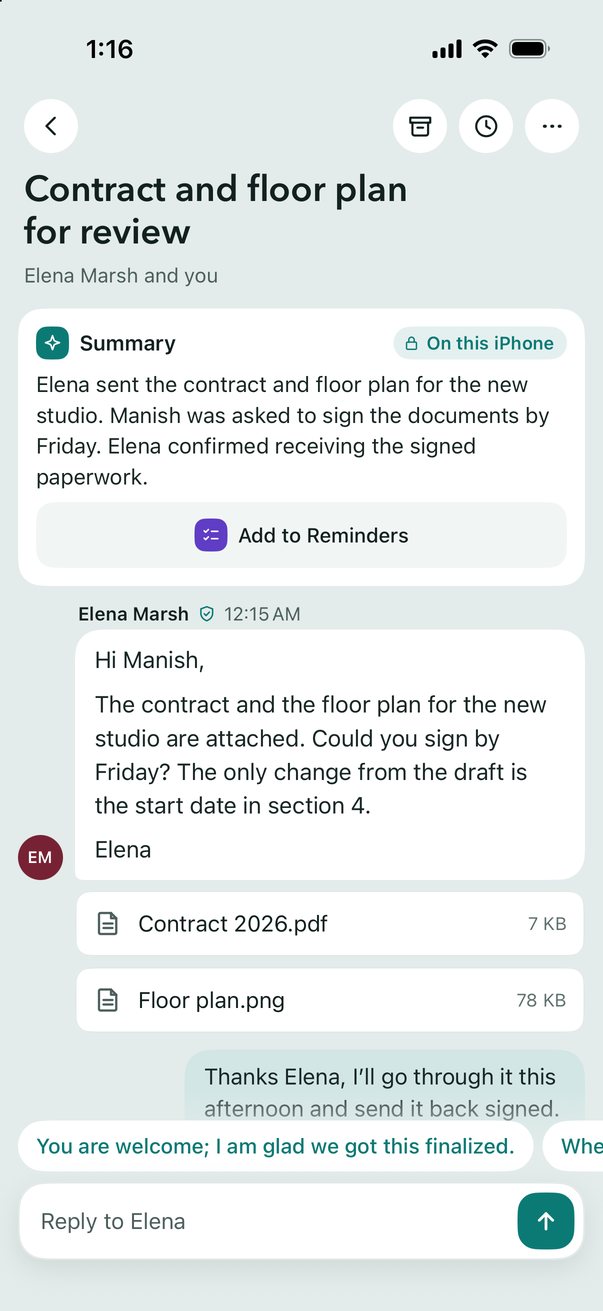
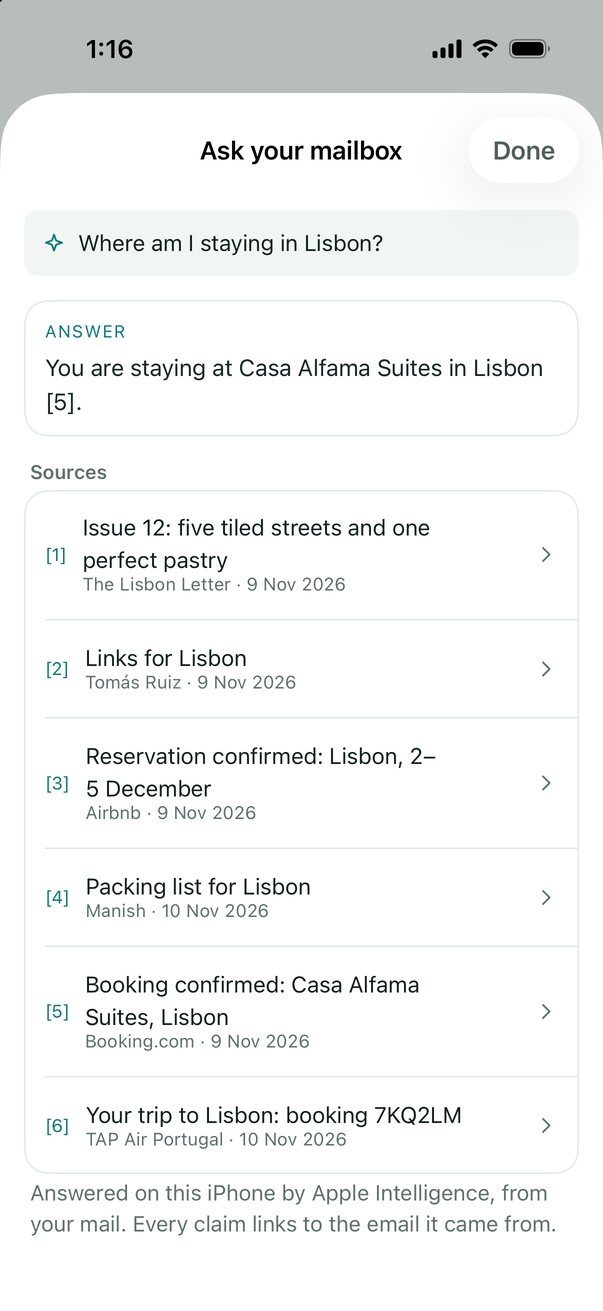
LocalInbox for iPhone and iPad has the same calm inbox, with Apple's model writing summaries and replies on the device. One licence covers your Mac, iPhone and iPad.
Bought LocalInbox for Mac? Your licence key unlocks it here too.
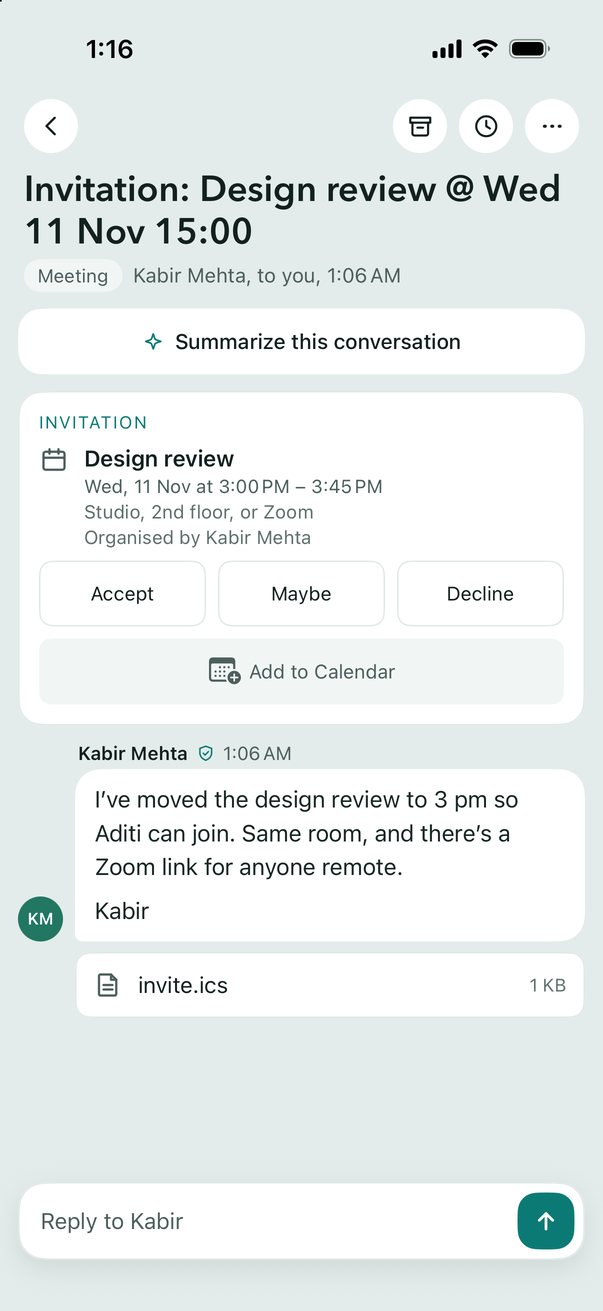
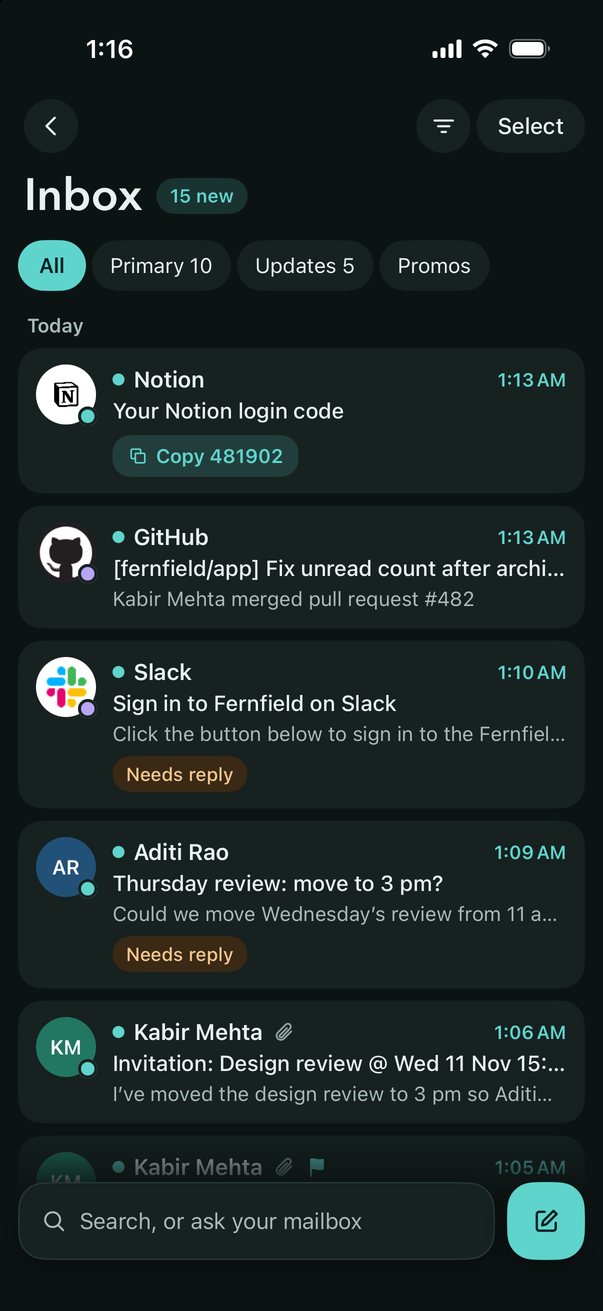
Set up from your Mac
Already use LocalInbox on your Mac? Scan a QR code and your accounts come over, passwords and all, on your Wi-Fi, encrypted, never through the internet.
Every account, one inbox
All your accounts together, sorted into Primary, Updates and Promotions, with To Reply for mail that's waiting on you. Search every account at once, and the server for older mail.
Summaries, replies and answers
One-line summaries and key points, three suggested replies written as you, Draft with AI and Rewrite, and answers that link to the emails they came from, from Apple Intelligence on the device.
Today and the Morning brief
The deadlines, trips and bookings found in your mail, on one page, and a Morning brief at the time you choose. Invitations go to Calendar, dates to Reminders, in a tap.
Snooze, Remind me, Undo Send
Snooze a conversation until later, get a nudge when nobody replies, and see what you're waiting on. Undo Send, Send & Archive, and checks for a forgotten attachment.
Rules and Unsubscribe
Rules that sort mail as it arrives, the same as the Mac's, categories in your own words, every newsletter in Subscriptions, and Unsubscribe in a tap.
Face ID, and nothing collected
Lock the app with Face ID. Trackers come out of your mail, passwords stay in the Keychain, and the App Store privacy label is Data Not Collected.
Made for iPhone and iPad
Notifications for new mail with Copy Code for sign-in codes, Send from the share sheet, Spotlight, Shortcuts and Focus filters. Two columns on iPad.
An iPhone or iPad with iOS 18 or later. Summaries, suggested replies, Draft with AI, Rewrite and Ask your mailbox need Apple Intelligence (iOS 26 on a supported iPhone or iPad).
06Pricing
Pay once. Keep it.
Try every feature free for 7 days, with no sign-up or card. Then one licence is yours for good, with no subscription.
7days, free
Every feature, on every account. No sign-up and no card. When you're ready, paste a licence key: nothing is lost.
Send to my Mac$29.99once
One licence for the Mac, iPhone and iPad, yours for good, with every update in 1.x. No tiers and no subscription.
7-day money-back guarantee
- Pay once. No subscription
- Mac, iPhone and iPad, one licence
- Up to 3 devices per licence
- Unlimited accounts
- Every on-device AI feature
- All 1.x updates
- 7-day money-back guarantee
Secure checkout by Dodo Payments. Your licence key arrives by email.
Mac, iPhone and iPad, one licence: a key from here unlocks LocalInbox for iPhone and iPad. You can also buy it in the app, at the same price.
On Windows, Linux or Android? Join the waitlist.
From the maker
Why I made LocalInbox
I wanted the useful parts of AI email (summaries, suggested replies, asking my inbox a question) without handing my mail to another company's servers. Apple's on-device model made that possible.
LocalInbox is built by one person, in Swift, and sold by my small business in India. You pay once, and the numbers on this page are measured. If something is missing or broken, write to me: I read every email and reply within two business days.
@ManishRaanaa on Xsupport@localinbox.appJoin the community on Discord
07Compare
How LocalInbox compares
What sets it apart from cloud-AI and subscription mail apps. Each comparison page names its sources and when they were checked.
| Feature | LocalInbox | Cloud-AI mail apps | Subscription mail apps |
|---|---|---|---|
| AI runs on your Mac by default | varies | ||
| Answers cite the emails they come from | varies | varies | |
| Text in images and PDFs is searchable | varies | varies | |
| Menu bar, Shortcuts, Focus filters, Spotlight | varies | varies | |
| No company server reads your mail, unless you choose | varies | ||
| Pay once | varies |
LocalInbox vs Apple MailLocalInbox vs Outlook for MacLocalInbox vs SparkLocalInbox vs SuperhumanAll comparisons
08FAQ
Questions, answered plainly
What is LocalInbox?
LocalInbox is a native Mac email app for Gmail, iCloud and any IMAP account, also on iPhone and iPad. It sorts, summarises and drafts replies on your device, with Apple's on-device model (or, on a Mac, a model you run in Ollama or LM Studio), so no AI cloud reads your mail unless you connect one yourself. It's made by one independent developer and costs $29.99 once, after a 7-day free trial.
How is LocalInbox different from Apple Mail?
Apple Mail is free and built into macOS, and both apps keep your mail between your Mac and your provider. LocalInbox adds a To Reply mailbox, Ask your mailbox with cited sources, phishing warnings that explain why, search inside image and PDF attachments, and Send Later and snooze that work while the app is closed. You can use both with the same accounts.
LocalInbox vs Apple MailIs it really a one-time payment?
Yes. You pay once and the licence is yours, with every 1.x update included. There is no monthly or yearly plan.
Can I try it first?
Yes. LocalInbox is free for 7 days with every feature, and there's no sign-up or card. When the trial ends, enter a licence key in the app. Your mail stays on your mail provider either way. On iPhone and iPad it's a free download with the same 7-day trial, which starts with a tap.
Where do I buy it?
From this site, with checkout by Dodo Payments. Your licence key arrives by email, and it works offline once it's activated. On iPhone and iPad you can also buy it in the app, through the App Store, at the same price. Either way it's one licence for the Mac, iPhone and iPad.
LocalInbox for iPhone and iPadHow many devices can I use it on?
Up to three per licence, Mac, iPhone or iPad, all with the same key. To move it to a new Mac, deactivate an old one in Settings › Licence. Bought in the iPhone app? Your iPhones and iPads on that Apple Account are unlocked by the App Store and use none of the three, and Settings › Unlock gives you a licence key for your Mac.
Is LocalInbox notarized by Apple?
Yes. Every release is signed with a Developer ID and notarized by Apple. The first time you open it, macOS asks whether to open an app downloaded from the internet: click Open. Updates install from inside the app and are checked against LocalInbox's release key first.
Which AI does LocalInbox use, and where does it run?
Apple's on-device model (Apple Intelligence), on your Mac. Sorting is done by fast local rules first; the model only files mail into categories you describe and double-checks suspected phishing. Summaries, replies and Ask your mailbox run on-device too. If you prefer, a model server you run on the same Mac, such as Ollama or LM Studio, can write them instead (Settings › Intelligence). Nothing is sent to an AI cloud unless you add your own key.
Using Ollama or LM StudioCan I use Claude or OpenAI, or connect an assistant?
Yes, on the Mac, and only if you choose to. Add your own Claude or OpenAI key in Settings › Intelligence and choose which features use it and which accounts it may read. It goes straight from your Mac to that provider, at its prices and under its terms. An outside assistant, through MCP, can read mail and save drafts, and can't send, archive or delete. Both are off until you turn them on.
Using your own keyDoes it work without Apple Intelligence?
Yes. Unified inbox, rules, search, phishing warnings, To Reply and everything else work on macOS 15, on Apple silicon and Intel Macs. Summaries, suggested replies, Rewrite, Draft with AI and Ask need Apple Intelligence (macOS 26 on Apple silicon), a model server on your Mac such as Ollama or LM Studio, or your own Claude or OpenAI key, chosen in Settings › Intelligence. On an Intel Mac, a model server or a key is the way.
Does it work offline?
Mail you've already synced, search and rules all work offline. Changes you make offline go to the server when you reconnect.
Which accounts work?
Gmail, iCloud Mail, Yahoo, AOL, Fastmail, Zoho, GMX, Proton Mail (through Proton Mail Bridge) and any IMAP server, each with a setup guide. Outlook and Microsoft 365 sign-in is coming soon.
Setup guidesIs there an iPhone or iPad version?
Yes: LocalInbox for iPhone and iPad is on the App Store. It has the same unified inbox, summaries, suggested replies and Ask your mailbox, with Apple's model on the device, and the same licence: a key bought here unlocks it too. It needs iOS 18 or later; the AI features need Apple Intelligence.
LocalInbox for iPhone and iPadIs there a Windows or Android version?
Not yet: LocalInbox is for the Mac, iPhone and iPad. If you'd use it on Windows, Linux or Android, join the waitlist. Enough interest decides what gets built next, and the people on the list hear first.
Join the waitlistCan I get a refund?
Yes. Ask within 7 days of buying and you get a full refund. The refund policy page has the details.
Another question? Email support@localinbox.app and you'll hear back from the person who makes LocalInbox.